
For parents and guardians
A parent’s guide to Amigo
How accounts, approvals and video visibility work, and where to get help if something goes wrong.


Free to download. Players under 13 sign up with a parent or guardian.
Why parents choose Amigo
Screen time that gets them moving
Active, not passive
Every step leads back to practicing a real move with a real ball, at home, in the garden or at the park.
Clear progress
Leagues, stars and trophies show what your child has learned and what comes next.
Confidence, not pressure
Ratings are about the move, not the person, and trying again is always encouraged.
With or without a club
Any child with a ball and a phone can learn. If they have a coach, the coach can join in too.
Controls and protections
What’s built in
Role and age decide what users can do, and when an adult needs to be involved.
Linked parent accounts
Players under 13 sign up with a parent or guardian, and the accounts stay linked.
Approvals for supervised accounts
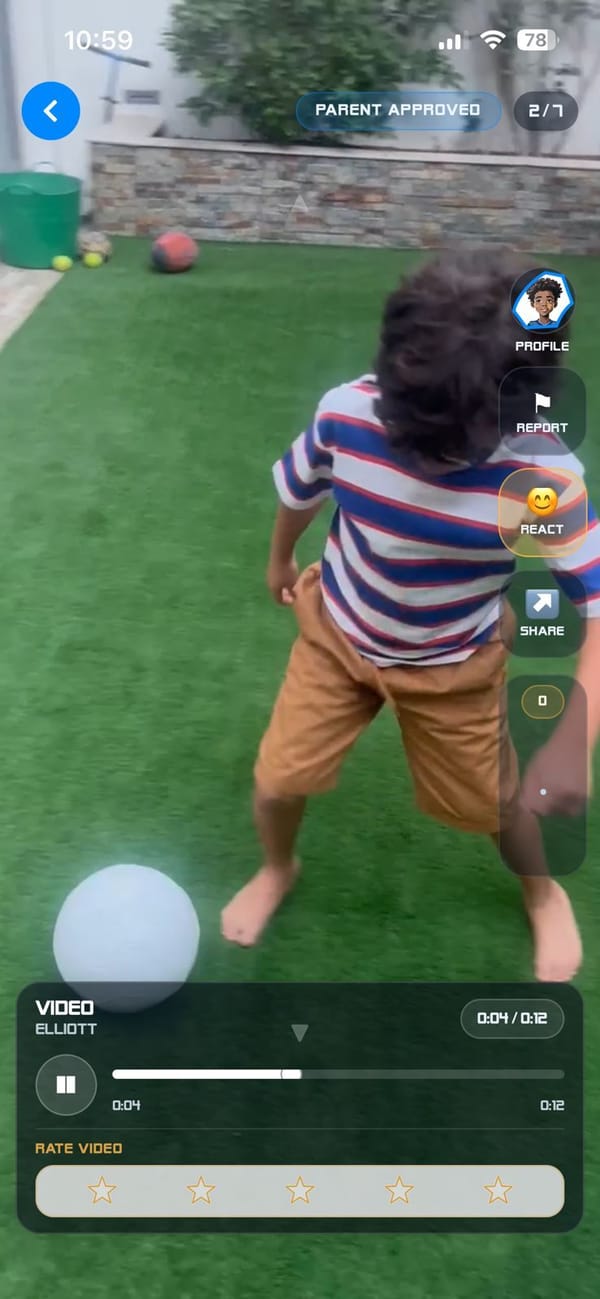
Selected actions, like uploading a video or connecting with a new Amigo or coach, come to you first to approve or reject.
Parent PIN
On shared devices, a PIN keeps your guardian controls separate from your child’s profile.
Star ratings only
No written comments and no open chat. Players interact through football actions, not messages.
Report, block and review
Report or block from any video. Uploads are screened automatically, our team reviews reports, and breaches can lead to removal or a ban.
Private coach work
Coach assignments, reports and scorecards are private by default.
Community rules are set out in our Play Nice Policy.
Setting up an account for a child under 13
It takes a few minutes. You create the account with your child, and you decide how much independence they have.
Download Amigo
Amigo is free on the App Store and Google Play.
Tap Sign Up and choose the under-13 route
Players under 13 always sign up with a parent or guardian.
Enter your child’s name and your email
Under-13 accounts use a parent or guardian email instead of the child’s. You can also add your child’s club or academy if they have one. It is optional.
Create your parent password
This is your credential. Your child plays in their own profile.
Choose the level of independence
Supervised accounts send selected actions, such as video uploads and new connections, to you for approval. Child Autonomy gives your child more independence while your accounts stay linked.
Switch profiles with your PIN
On a shared device, choose your child’s profile to play, or your parent profile, protected by a PIN, to review requests and settings.
Players aged 13 and over can create their own player account.
What is public and what is private
In Amigo, “public” means visible to other Amigo users in the app, so videos can be rated. Here is how each type of video works.
| Video type | Default visibility | Can be rated? |
|---|---|---|
| Curriculum attempt | Public in the app | Yes, with stars only |
| Challenge | Visible based on the challenge’s state | Yes, when live |
| Coach assignment | Private by default | No, while private |
| Coach-approved assignment | Public only if your child chooses to share it | Yes, once shared |
| Freestyle | Public in the app | Yes, with stars only |
Supervised accounts: uploads can require your approval before they appear. You see the video first, then choose Approve or Reject.
Your child’s data
We only ask for the information we really need, we keep it protected, and we never sell your information to anyone.
- Ask to access, correct or delete your child’s information: privacy@
amigofootball.com - Delete an account in the app: Settings, then Account, then Delete Account
- Read the Privacy Policy, the Children’s Privacy (COPPA) Policy and Kids Privacy and Safety
If something goes wrong
If your child sees something that makes them feel uncomfortable or unsafe, use the Report or Block controls on the video and talk to them about it.
- Email our safety team: safety@
amigofootball.com - Questions about the app: support@
amigofootball.com
FAQ
Questions from parents
Is Amigo safe for children?
Amigo is designed with safety built in. Players under 13 use a linked parent or guardian account, approval controls support supervised participation, and community feedback is star ratings only, with no written comments and no open chat. Every video can be reported or blocked, content is screened, and reports are reviewed by our team.
Can other users message my child?
No. Amigo has no open chat and no written comments. Players interact only through structured football actions: rating moves, Amigo requests and challenges.
Who can see my child's videos?
Curriculum, challenge and freestyle videos are visible to other Amigo users inside the app so they can be rated with stars. Coach assignment videos are private by default, and a coach-approved assignment only becomes public if your child chooses to share it. With a supervised account, uploads can need your approval first.
What age is Amigo for?
Amigo is made for children and teenagers who love football. Players under 13 sign up with a linked parent or guardian account, and players aged 13 and over can create their own account. The app is rated 9+ on the App Store and Everyone on Google Play.
How do I delete an account or my child's data?
In the app, go to Settings, then Account, then Delete Account. If that option is not available in your version, email support@amigofootball.com and we will help. Parents and guardians can also ask to access, correct or delete a child's information by emailing privacy@amigofootball.com.
How do I report a problem or unsafe behaviour?
Use the Report or Block controls on any video, or email safety@amigofootball.com. If anyone is in immediate danger, contact your local emergency services first. Amigo support is not an emergency service.
Last updated
Ready when you are
Download Amigo for free and set up your child’s account together. It only takes a few minutes.
